2.7 Connection of Extensions
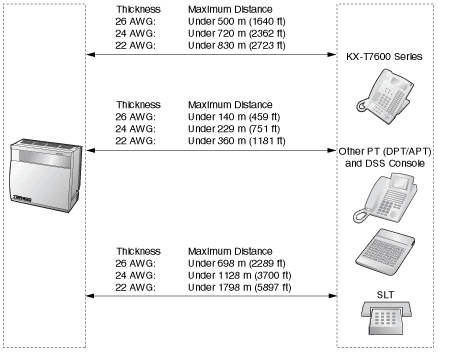
2.7.1 Maximum Cabling Distance of the Extension Wiring (Twisted Cable)
|
| |
| | | | | | | | | | | | MSLC16, SLC16, SLC8 Cards |
| | | | | | | | | |
|
" " indicates that the extension card is available for the terminal. " indicates that the extension card is available for the terminal. |
2.7.2 Parallel Connection of the Extensions
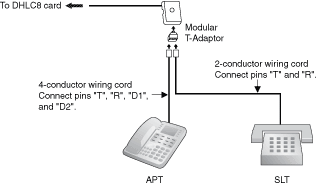
With APT
| Any SLT can be connected in parallel with an APT as follows: |
|
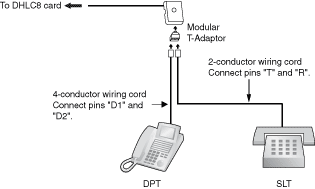
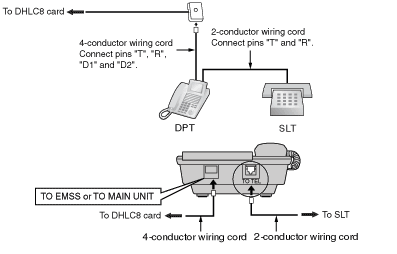
With DPT
| Any SLT can be connected in parallel with a DPT as follows: |
|
Notes |
| • | In addition to an SLT, an answering machine, a fax machine or a modem (PC) can be connected in parallel with APTs and DPTs. |
| • | If the eXtra Device Port (XDP) mode is enabled through system programming, parallel connection is not possible. Refer to "1.10.9 Paralleled Telephone" and "2.1.1 Extension Port Configuration" in the Feature Guide for further information. |
2.7.3 Extra Device Port (XDP) Connection
| Any SLT can be connected in parallel with DPT as follows: |
2.7.4 First Party Call Control CTI Connection
| CTI connection between a PC and a KX-T7633/T7636 DPT provides the first party call control. The CTI connection is made via USB interface (version 1.1), and uses the CSTA Phase 3 protocol. |
| A USB Module (KX-T7601) must be connected to the KX-T7633/T7636 DPT. |
Note | | The operating system of the PC required for first party call control depends on your CTI application software. For details, refer to the manual for your CTI application software. |
|
|
Note | | Maximum length of the USB cable is 3 m (9.8 ft). |
|