2.12 Starting the Hybrid IP-PBX
2.12.1 Starting the Hybrid IP-PBX
CAUTION |
| • | SD Memory Card must be inserted in the SD Memory Card slot of the MPR card before start up. |
| • | Before touching the System Clear Switch and the Reset Button, discharge static by touching ground or wearing a grounding strap. |
| • | Once you have started the Hybrid IP-PBX and if you unplug the Hybrid IP-PBX, do not perform the following procedures to start the Hybrid IP-PBX again. Otherwise, your programmed data is cleared. To restart the Hybrid IP-PBX, refer to "4.1.4 Using the Reset Button". |
| • | The Hybrid IP-PBX will continue to be powered even if the power switch is turned "OFF". |
| • | The power supply cord is used as the main disconnect device, ensure that the socket-outlet is located/installed near the equipment and is easily accessible.
|
| 1. | Set the System Clear Switch to the "SYSTEM INITIALIZE" position. |
| |
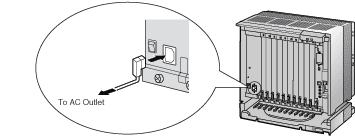
| 2. | Plug the AC power cord into the Hybrid IP-PBX and an AC outlet, and turn on the Hybrid IP-PBX. |
| Note | | For safety reasons, do not stretch, bend, or pinch the AC power cord. |
|
| |
| 3. | Press the Reset Button with a pointed tool. (The RUN indicator will flash.) |
| 4. | While the RUN indicator is flashing (within about 10 s), return the System Clear Switch to the "NORMAL" position. Depending on the configuration, initialization takes about 1 min to 3 min. If successfully executed, the RUN indicator will stop flashing and be kept lit.
|
All data will be cleared, and the Hybrid IP-PBX as well as all optional service cards (except for the IP-GW4 card) will be initialized to the default values. The DPTs should show the time as 01:00.
The data of the IP-GW4 card will not be initialized. |
Note | | Use only the AC power cord included with the PSU. |
|
LED Indications
Indication | Color | Description |
|---|
| | OFF: Power Off (includes normal reset)
ON: Power On and running (on-line)
Flash (60 times per minute): Power On and starting
Flash (120 times per minute): Power On and resetting before system clear |
|
| | OFF: Normal
ON: Alarm (CPU stop, alarm for each card)
Flash: Alarm (MPR file error in restarting) |
|
Confirming the CO Line Connection
| After initialization, program the Hybrid IP-PBX and establish CO line connection, and then use a PT to confirm it. |
To confirm, dial [ ] [3] [7] + CO line number (3 digits) or press S-CO button (CO01 to CO64). You will hear a dial tone if CO line is available and connected. ] [3] [7] + CO line number (3 digits) or press S-CO button (CO01 to CO64). You will hear a dial tone if CO line is available and connected. |