1.7 Extension Settings
1.7.1 Timed Reminder
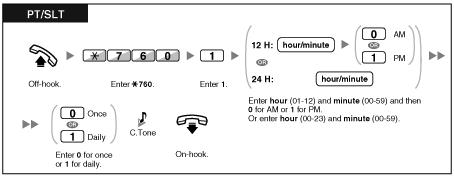
You can receive an alarm at your telephone to remind you of a meeting, appointment or as a wake-up call. The alarm can occur either once or daily (every day until canceled) at a preset time.
When you go off—hook to answer, you will hear a special dial tone or prerecorded message. |
To set
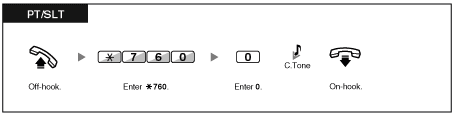
To cancel
To stop or answer the ringback
To confirm
| | • | You can also confirm the Timed Reminder by using the soft button. | | • | The alarm keeps ringing for preprogrammed seconds. | | • | If you receive an incoming call during ringback, the ringing starts after the ringback stops. | | • | If you are having a conversation exceeding alarm ringing period, the ringback will start after your conversation. |
|
1.7.2 Do Not Disturb (DND)
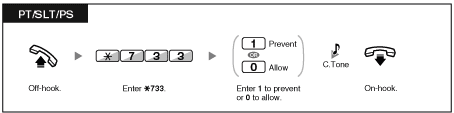
| You may set this feature when you are in a meeting or busy. |
To set/cancel
| | • | When using a proprietary telephone, you can set or cancel Do Not Disturb by pressing the FWD/DND button (fixed button) instead of " 710". 710". |
|
| | • | The FWD/DND button light shows the current status as follows:
Off: Both features are not set.
Flashing red slowly: FWD mode
Red on: DND mode | | • | You can change the mode by pressing the FWD/DND button while on-hook. This only applies to a FWD/DND button customized on a flexible button; it cannot be done on the FWD/DND button (fixed button).
(Refer to "Fixed Buttons" in "1.1.1 Before Operating the Telephones".) |
|
| | • | If your extension has set this feature, a calling extension will hear DND tone. | | • | If this feature is set, the Call Forwarding (FWD) feature does not work. | | • | Specified extensions can override this feature and call DND extensions (DND Override). | | • | When intercom calls are set to be handled differently from outside calls (DND set/cancel), we recommend establishing buttons for both FWD/DND–Outside calls and FWD/DND–Intercom calls, because: | | | a) | the light patterns of the FWD/DND–Both calls button (including FWD/DND button [fixed button]) will indicate the setting for either outside calls or intercom calls, but not both. | | Note
The DND icon on a PS display reflects the setting for outside calls only. |
| | b) | pressing the FWD/DND–Both calls button will not change the FWD or DND mode for intercom calls and outside calls separately. |
|
|
1.7.3 Call Waiting/Off-Hook Call Announcement (OHCA)/Whisper OHCA
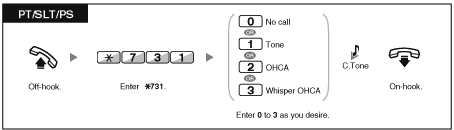
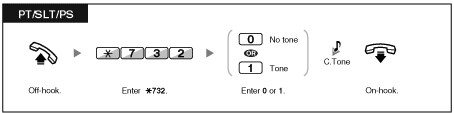
| During a conversation, you can be informed of a call waiting with a tone or voice announcement through your built-in speaker or handset. (Default: Enable–Tone) |
Call Waiting Tone:
a waiting tone through the built-in speaker of PT/handset of SLT. To change the tone from PT, refer to "3.1.1 Personal Programming".
OHCA:
a voice announcement through the built-in speaker
Whisper OHCA:
a voice announcement through the handset |
|
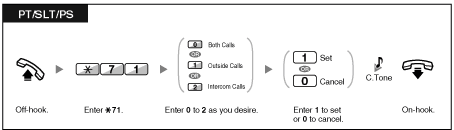
To set/cancel for intercom calls
To set/cancel for outside calls
1.7.4 Calling Line Identification Presentation (CLIP)
CLIP:
When making an outside call, you can present your preprogrammed telephone number to the called party.
You can select the telephone number sent, either the number of the line used or the number assigned to your extension.
If you select "Public", the calling/called party sees the number of the line used (subscriber's number).
If you select "Your extension", they see the telephone number assigned on your extension. |
To show either the number assigned to the CO line or your extension
| | • | If you use the G-DN button to make a call to the other party, the telephone number assigned to the G-DN will be used. |
|
1.7.5 Calling Line Identification Restriction (CLIR)
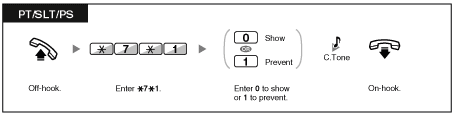
| When making an outside call, you can select whether the called party can see your telephone number or not. |
To show/prevent
| | • | You can change the mode by pressing a preset CLIR button while on-hook.
The CLIR button light shows the current status as follows:
Off: shows your telephone number.
Red on: prevents your telephone number being displayed. | | • | Availability of this feature depends on the ISDN service of your telephone company. |
|
1.7.6 Executive Busy Override Deny
| | • | Some extensions may be prohibited from performing this feature. |
|
1.7.7 Background Music (BGM)
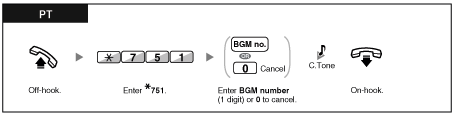
You can listen to the background music through your telephone speaker while on-hook. An external music source, such as a radio, must be connected.
If your extension becomes busy (off-hook, making or receiving a call etc.), the music stops temporarily. When you go back on-hook, the music starts again. |
| |
To select and set/cancel
1.7.8 Data Line Security
| You can protect the line against audible notification tones, such as a call waiting tone during a conversation. Set this feature if your extension has a data communication device, such as a computer or fax machine connected to ensure secure data transmission. |
To set/cancel
1.7.9 Time Service
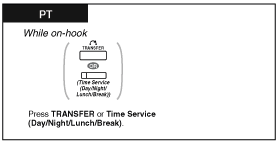
| You can check the current status of the Time Service on the display. |
| |
| | • | The Time Service (Day/Night/Lunch/Break) button light always shows the current status as follows: | | Off: Day mode
Green on: Lunch mode
Flashing Green: Break mode
Red on: Night mode
Flashing Red: Holiday mode |
| | • | Any extension user except the managers can check the current status by pressing the Time Service (Day/Night/Lunch/Break) button. |
|
1.7.10 Paralleled Telephone
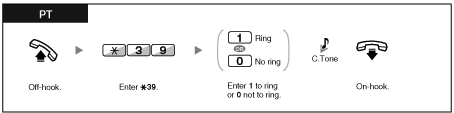
A proprietary telephone extension user can choose whether the single line telephone connected in parallel will ring or not, when an incoming call is received.
(Default: Ring) |
| |
| | • | Even if "No ring" is selected, calls can be made and answered on the single line telephone by lifting the handset. | | • | If you go off-hook while your paralleled telephone is in use, the call will switch over to you. |
|
1.7.11 Wireless XDP Parallel Mode
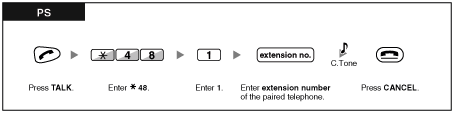
Your PS can be used in parallel with a PT or SLT.
When in this mode, incoming calls to a wired telephone also ring the paired PS. |
To set
To cancel
| | • | Some wired telephones are prohibited from using this feature. | | • | If you go off-hook while your paralleled telephone is in use, the call will switch over to you. |
|
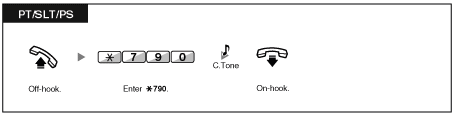
1.7.12 Extension Feature Clear
You can reset the settings of the following features on your extension to the default settings with one operation.
This feature is also known as Station Program Clear. |
Features | Default Setting |
|---|
| | | Message Waiting–(All the messages that have been left by other extension users) |
| | | | | | | | | | | | | | | | | Executive Busy Override Deny |
| | | | | | | | The telephone in parallel rings. |
| | |
|
| * These features may not be reset depending on the system programming. |
|
| | • | After performing Extension Feature Clear, the setting of Call Waiting becomes "Enable–Tone". In this case, dial tone 2 will be heard when you go off-hook. |
|
|