3.1 Personal Programming

3.1.1 Personal Programming

You can customize your telephone features desk and extension. For example, you can change the initial settings or button features according to your needs.
title2.gif Extension PIN (Personal Identification Number)
hints.gif
If you change your desk and extension, refer to "1.10.1 Walking Extension".

title2.gif Extension PIN (Personal Identification Number)

You can assign a password to each extension.
The following features require an extension PIN.
1.Screening calls (Live Call Screening [LCS])
2.Prohibiting other people from seeing your personal directory and call log (Directory and Call Log Lock)
3.Using the same settings as your extension at other extensions (Walking Extension)
4.Remote Control Operation (Walking COS)
5.Extension Lock Clear

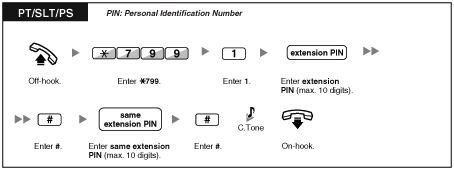
To set
imu3500a.gif

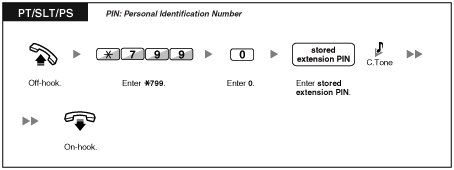
To cancel
imu3505a.gif
conditio.gif
WARNING
When a third party discovers the password (extension PIN) of the PBX, there will be a risk that they will make fraudulent phone calls using the telephone line, and the cost will be charged to your own account. In order to avoid this problem, we strongly recommend the following points:
a) Carefully maintain the secrecy of the PIN.
b) Specify a complicated PIN as long and random as you can make it.
c) Change the PIN frequently.
Valid numbers for an extension PIN are "0" through "9".
If the wrong extension PIN is entered for a preprogrammed number of times, the PIN is locked.
If you forget your extension PIN or your extension PIN is locked, your manager can clear the extension PIN and extension PIN lock.

3.1.2 Settings on the Programming Mode

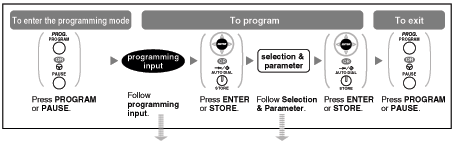
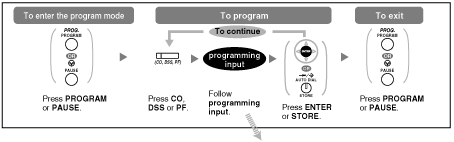
You can program features using the programming mode.
title2.gif Setting Features
title2.gif Clearing Features
conditio.gif
To exit at any time, lift the handset.
To enter the programming mode when using a PS, refer to "Operating Instructions" for PS.
The following items with "*" (asterisk) are not available for a PS.

title2.gif Setting Features

The default settings are shown in bold letters. For later reference, place a check mark in the boxes below to indicate your customized setting.
imu4000a.gif

Item

Programming Input

Selection & Parameter

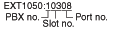
Your extension information
pro_0.gifpro_0.gif
It shows PBX number, slot number and port number
<example>
     imu9999.gif
Preferred display contrast level from the 4 levels available.
(Display Contrast Selection)*
pro_0.gifpro_1.gif
pro_1.gif
box_tick.gif Light
pro_2.gif
box_tick.gif Little Light
pro_3.gif
box_tick.gif Little Dark
pro_4.gif
box_tick.gif Dark
Which display language do you prefer?
(Display Language Selection) 
pro_0.gifpro_2.gif
pro_1.gif
box_tick.gif English
pro_2.gif
box_tick.gif 2nd Language
pro_3.gif
box_tick.gif 3rd Language
pro_4.gif
box_tick.gif 4th Language
pro_5.gif
box_tick.gif 5th Language
Would you like the call duration to be shown automatically on the display when answering an outside call?
(Display Switching Mode) 
pro_0.gifpro_3.gif
pro_0.gif
box_tick.gif No–Manual (The display keeps showing all of the outside caller's information unless you change it to the call duration manually.)
pro_1.gif
box_tick.gif Yes–Automatic (The first line of the display will change to the call duration automatically when you answer an outside call.)
Would you like to turn on the display backlight of the KX-T7633/KX-T7636?
(Display Backlight Selection)* 
pro_0.gifpro_4.gif
pro_0.gif
box_tick.gif Yes–ON in use
pro_1.gif
box_tick.gif Yes–always ON
pro_2.gif
box_tick.gif No–always OFF
Would you like to dial a preset number simply by going off-hook?
pro_1.gifpro_1.gif
desired no. (max. 32 digits)
pro_1.gifpro_2.gif
pro_0.gif
box_tick.gif Don't use
pro_1.gif
box_tick.gif Use
Should you prevent your number being displayed on the called party's telephone?
(Calling Line Identification Restriction [CLIR]) 
pro_1.gifpro_3.gif
pro_0.gif
box_tick.gif No–Allows your number to be displayed
pro_1.gif
box_tick.gif Yes–Prevent your number being displayed
Which number should be displayed on the called party's telephone? (Calling Line Identification Presentation [CLIP]) 
pro_1.gifpro_4.gif
pro_0.gif
Caller ID assigned to your extension
pro_1.gif
Caller ID assigned on the CO line being used
Which do you prefer to seize when you go off-hook to make calls?
(Preferred Line Assignment–Outgoing) 
pro_1.gifpro_9.gif
pro_0.gif
box_tick.gif No line
pro_1.gif
box_tick.gif An idle CO line
pro_2.gif +
CO button no.**
(01-36)
or
imu9997a.gif
box_tick.gif A CO/G-DN button
** CO button numbers (25-36) are available only when the Add-on Key Module is set up to your telephone.
pro_3.gif
or
imu9998a.gif
box_tick.gif Intercom
Which line do you prefer to answer when you go off-hook?
(Preferred Line Assignment–Incoming) 
pro_2.gifpro_0.gif
pro_0.gif
box_tick.gif No line
pro_1.gif
box_tick.gif The longest ringing line (when multiple calls arrive)
pro_2.gif +
CO button no.**
(01-36)
or
imu9997a.gif
box_tick.gif A assigned outside button
** CO button numbers (25-36) are available only when the Add-on Key Module is set up to your telephone.
How do you prefer to receive an intercom call?
(Alternate Receiving–Ring/Voice)* 
pro_2.gifpro_1.gif
pro_0.gif
box_tick.gif Ringing (Tone Call)
pro_1.gif
box_tick.gif Directly–The party's voice is heard without ringing.
pro_2.gif
box_tick.gif Ring only–Prohibiting the caller switching to the voice mode.
Should the single line telephone in parallel ring? (Paralleled Telephone)* 
pro_2.gifpro_2.gif
pro_0.gif
box_tick.gif No–The telephone will not ring.
pro_1.gif
box_tick.gif Yes–The telephone will ring.
Do you prefer to answer a call without going off-hook regardless of the AUTO ANS button status?
(Forced Answerback Selection)* 
pro_2.gifpro_3.gif
pro_0.gif
box_tick.gif No–Disable
pro_1.gif
box_tick.gif Yes–Enable
Which service do you prefer when a calling party is recording a message in your mailbox?
(Live Call Screening Mode Set)* 
pro_2.gifpro_5.gif
pro_0.gif
box_tick.gif You can monitor the message through the telephone speaker. (Hands-free mode)
pro_1.gif
box_tick.gif Only an alarm tone is heard. (Private mode)
Would you like to keep recording after answering the call in the LCS mode?
(LCS Mode Set [After Answering]) 
pro_2.gifpro_6.gif
pro_0.gif
box_tick.gif No–Stop recording
pro_1.gif
box_tick.gif Yes–Keep recording
Do you prefer to receive call waiting for outside calls?
pro_3.gifpro_0.gif
pro_0.gif
box_tick.gif No (No tone)
pro_1.gif
box_tick.gif Yes (Tone)
Which type of call waiting for intercom calls do you prefer?
(Call Waiting Selection) 
pro_3.gifpro_1.gif
pro_0.gif
box_tick.gif No call
pro_1.gif
box_tick.gif Tone
pro_2.gif
box_tick.gif Voice announcement through the built-in speaker (OHCA)
pro_3.gif
box_tick.gif Voice announcement through the handset (Whisper OHCA)
Which type of call waiting tone do you prefer?
(Call Waiting Tone Type Selection) 
pro_3.gifpro_2.gif
pro_0.gif
box_tick.gif Tone 1
pro_1.gif
box_tick.gif Tone 2
Would you like to show a message on the caller's telephone display?
(Absent Message) 
pro_4.gifpro_0.gif
pro_0.gif
box_tick.gif No–Off
message no. (1-8)
box_tick.gif Yes–Shows the selected message.
pro_9.gif
box_tick.gif Yes–Shows your personal message.
Creating your personal message.
(Personal Absent Message) 
pro_4.gifpro_1.gif
message (max. 16 characters)
Where are your incoming calls forwarded or refused?
(Call Forwarding [FWD]/Do Not Disturb [DND])
pro_50etc.gif
(for both calls)

pro_5.gifpro_1.gif
(for outside calls)


pro_5.gifpro_2.gif
(for intercom calls)
pro_0.gif
box_tick.gif Off
pro_1.gif
box_tick.gif Do Not Disturb (DND)
pro_2.gif + desired no.
(max. 32 digits)
box_tick.gif All–Forward all calls
pro_3.gif + desired no.
(max. 32 digits)
box_tick.gif Busy–Forwarded when your extension is busy.
pro_4.gif+ desired no.
(max. 32 digits)
box_tick.gif No Answer–Forwarded when you do not answer.
pro_5.gif+ desired no.
(max. 32 digits)
box_tick.gif Busy/No Answer–Forwarded when you do not answer or when your extension is busy.
To set the timer for "No Answer" and "Busy/No Answer".
(FWD N/A Timer) 
pro_5.gifpro_3.gif
imu9995a.gif(0-120) seconds
(Default: 15 seconds)
Should you prohibit other people from picking up your calls?
(Call Pickup Deny)
pro_6.gifpro_0.gif
pro_0.gif
box_tick.gif No–Allow
pro_1.gif
box_tick.gif Yes–Deny
Do you use the headset?
(Headset Operation)*  
pro_6.gifpro_1.gif
pro_0.gif
box_tick.gif No–Headset off
pro_1.gif
box_tick.gif Yes–Headset on
Do you prohibit other people from joining your conversation?
(Executive Busy Override Deny) 
pro_6.gifpro_2.gif
pro_0.gif
box_tick.gif No–Allow
pro_1.gif
box_tick.gif Yes–Deny
Would you like to prohibit paging announcements?
(Paging Deny)* 
pro_6.gifpro_3.gif
pro_0.gif
box_tick.gif No–Allow
pro_1.gif
box_tick.gif Yes–Deny
Do you prefer to hear the key pad tone?
(Key Pad Tone Set)* 
pro_6.gifpro_4.gif
pro_0.gif
box_tick.gif No–Off
pro_1.gif
box_tick.gif Yes–On
Do you want back ground music through your telephone speaker while on-hook?
(Background Music [BGM])* 
pro_6.gifpro_5.gif
pro_0.gif
box_tick.gif No–Off
pro_1.gif + BGM no. (1digit)
box_tick.gif Yes–On
Would you like to set your extension PIN or change a stored extension PIN to new one?
(Extension PIN [Personal Identification Number]) 
pro_9.gifpro_0.gif
extension PIN
(max. 10 digits) + ENTER/STORE + same extension PIN
To set an extension PIN
stored extension PIN +
new extension PIN
(max. 10 digits) + ENTER/STORE + same extension PIN
To change a stored extension PIN to new one
To prevent other people from using your telephone.
(Extension Lock)  
pro_9.gifpro_1.gif
extension PIN
(max. 10 digits) +
pro_0.gif
box_tick.gif To unlock
extension PIN
(max. 10 digits) + pro_1.gif
box_tick.gif To lock
To prevent other people from seeing your personal directory and call log.
(Directory and Call Log Lock)* 
pro_9.gifpro_2.gif
extension PIN
(max. 10 digits) +
pro_0.gif
box_tick.gif To unlock
extension PIN
(max. 10 digits) + pro_1.gif
box_tick.gif To lock
Do you prefer to set the One-touch dialing only?
(One-touch Dialing Assignment Mode Selection) 
pro_#.gifpro_asterisk.gif
pro_0.gif
box_tick.gif No–Normal (Any Flexible CO buttons can be modified.)
pro_1.gif
box_tick.gif Yes–Only One-touch dialing buttons can be modified. However, to modify them, there is no need to enter "2" before the number.
conditio.gif
WARNING
When a third party discovers the password (extension PIN) of the PBX, there will be a risk that they will make fraudulent phone calls using the telephone line, and the cost will be charged to your own account. In order to avoid this problem, we strongly recommend the following points:
a) Carefully maintain the secrecy of the PIN.
b) Specify a complicated PIN as long and random as you can make it.
c) Change the PIN frequently.
After the program number is entered, the program title is displayed.
The programming screen can be changed with the Navigator key (Up or Down).
hints.gif
You can select the parameter with the Navigator Key (Up or Down) instead of entering a number.

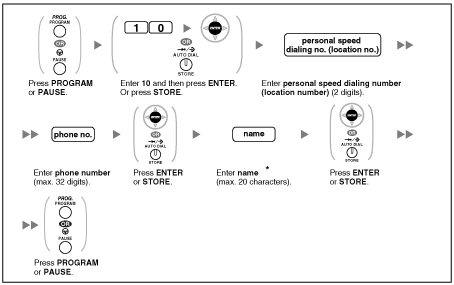
To store the names and numbers for personal speed dialing
imu4020b.gif

conditio.gif
* To enter characters, refer to "title2.gif Entering Characters".

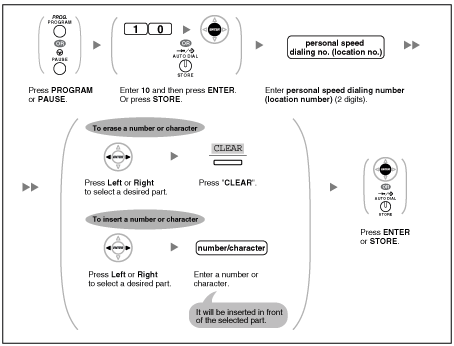
To edit the names and numbers for personal speed dialing
imu4021a.gif

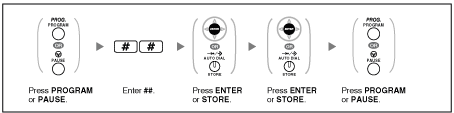
title2.gif Clearing Features

You can reset the settings of the following features on your extension to the default settings with one operation.

Features

Default Setting

Display Switching Mode
Automatic
Hot Line
Off
Calling Line Identification Restriction [CLIR]
Allow
Calling Line Identification Presentation [CLIP]
Caller ID assigned on your extension
Preferred Line Assignment–Outgoing
Intercom
Preferred Line Assignment–Incoming
The longest ringing line
Alternate Receiving–Ring/Voice
Ringing (Tone Call)
Paralleled Telephone
Paired SLT will ring
Forced Answerback Selection
Disable
Live Call Screening Mode Set
Hands-free mode
LCS Mode Set [After Answering]
Stop recording
Call Waiting Selection–Intercom Calls/Outside Calls
Enable (Tone)
Call Waiting Tone Type Selection
Tone 1
Absent Message
Off
Personal Absent Message
Cleared
Call Forwarding [FWD]/Do Not Disturb [DND]–Intercom Calls/Outside Calls
Off
FWD N/A Timer
15 seconds
Call Pickup Deny
Allow
Headset Operation
Headset off
Executive Busy Override Deny
Allow
Paging Deny
Allow
Key Pad Tone Set
On
Background Music [BGM]
Off
Data Line Security
Off
Log-in/Log-out
Log-in
Message Waiting
Off
Timed Reminder
Cleared

To set
imu4022a.gif

conditio.gif
If you do not desire that the Call Waiting, FWD/DND or Hot Line to be cleared by this feature, please ask your dealer.

3.1.3 Customizing the Buttons

You can change the flexible CO buttons/DSS buttons, and programmable feature (PF) buttons on PTs, DSS Consoles, Add-on Key Modules, and PSs to the following function buttons. For example, if your telephone has more CO buttons than available CO lines, you may change unused CO buttons to one touch buttons.
imu4024a.gif

Buttons

Programmable Button

Programming Input

CO

DSS

PF

Loop-CO (L-CO) 
tick.gif
tick.gif
 
pro_asterisk.gif
Group-CO (G-CO) 
tick.gif
tick.gif
 
pro_#.gif + CO line group no. (2 digits)
Single-CO (S-CO) 
tick.gif
tick.gif
 
pro_0.gif + CO line no. (3 digits)
Direct Station Selection (DSS) 
tick.gif
tick.gif
 
pro_1.gif + Extension no.
One-touch Dialing*1 
tick.gif
tick.gif
tick.gif
pro_2(note).gif + Desired no. (max. 32 digits)
Group Directory Number (G-DN) 
tick.gif
tick.gif
 
pro_3.gifpro_0.gif + Incoming call distribution group extension no.
Message 
tick.gif
tick.gif
 
pro_4.gifpro_0.gif
Message for another extension 
tick.gif
tick.gif
 
pro_4.gifpro_0.gif + Extension no./Incoming call distribution group extension no.
Call Forwarding (FWD)/Do Not Disturb (DND)–Both calls 
tick.gif
tick.gif
 
pro_4.gifpro_1.gif
FWD/DND–Outside calls 
tick.gif
tick.gif
 
pro_4.gifpro_2.gif
FWD/DND–Intercom calls 
tick.gif
tick.gif
 
pro_4.gifpro_3.gif
Group FWD–Both calls 
tick.gif
tick.gif
 
pro_4.gifpro_4.gif + Incoming call distribution group extension no.
Group FWD–Outside calls 
tick.gif
tick.gif
 
pro_4.gifpro_5.gif + Incoming call distribution group extension no.
Group FWD–Intercom calls 
tick.gif
tick.gif
 
pro_4.gifpro_6.gif + Incoming call distribution group extension no.
Account 
tick.gif
tick.gif
 
pro_4.gifpro_8.gif
Conference 
tick.gif
tick.gif
 
pro_4.gifpro_9.gif
Terminate 
tick.gif
tick.gif
 
pro_5.gifpro_0.gif
External Feature Access (EFA) 
tick.gif
tick.gif
 
pro_5.gifpro_1.gif
Call Park 
tick.gif
tick.gif
 
pro_5.gifpro_3.gif + Parking zone no. (2 digits)
Call Park (Automatic Park Zone) 
tick.gif
tick.gif
 
pro_5.gifpro_3.gifpro_asterisk.gif
Call Log*3 
tick.gif
tick.gif
 
pro_5.gifpro_4.gif
Call Log for ICD Group*3 
tick.gif
tick.gif
 
pro_5.gifpro_4.gif + Incoming call distribution group extension no.
Log-in/Log-out 
tick.gif
tick.gif
 
pro_5.gifpro_5.gif
Log-in/Log-out of a specified group 
tick.gif
tick.gif
 
pro_5.gifpro_5.gif + Incoming call distribution group extension no.
Log-in/Log-out for all groups 
tick.gif
tick.gif
 
pro_5.gifpro_5.gifpro_asterisk.gif
Hurry-up 
tick.gif
tick.gif
 
pro_5.gifpro_6.gif + Incoming call distribution group extension no.
Wrap-up 
tick.gif
tick.gif
 
pro_5.gifpro_7.gif
System Alarm*3 
tick.gif
tick.gif
 
pro_5.gifpro_8.gif
Time Service (Day/Night/Lunch/Break) 
tick.gif
tick.gif
 
pro_5.gifpro_9.gif + 0/1/2/3*4 (+ pro_#.gif + Tenant no.)
Answer*3 
tick.gif
tick.gif
 
pro_6.gifpro_0.gif
Release*3 
tick.gif
tick.gif
 
pro_6.gifpro_1.gif
Toll Restriction (TRS) 
tick.gif
tick.gif
 
pro_6.gifpro_2.gif + Toll Restriction (TRS) Level (1-7)
Calling Line Identification Restriction (CLIR) 
tick.gif
tick.gif
 
pro_6.gifpro_4.gif
Connected Line Identification Restriction (COLR) 
tick.gif
tick.gif
 
pro_6.gifpro_5.gif
Headset*3 
tick.gif
tick.gif
 
pro_6.gifpro_7.gif
Time Service Switching Mode (Automatic/Manual) 
tick.gif
tick.gif
 
pro_6.gifpro_8.gif (+ Tenant no.)
Two-way Record*5 
tick.gif
tick.gif
 
pro_9.gifpro_0.gif + Voice mail floating extension no.
Two-way Transfer*5 
tick.gif
tick.gif
 
pro_9.gifpro_1.gif + Voice mail floating extension no.
One-touch Two-way Transfer*5 
tick.gif
tick.gif
 
pro_9.gifpro_1.gif + Voice mail floating extension no. + # + Extension no./Incoming call distribution group extension no.
Live Call Screening (LCS)*5 
tick.gif
tick.gif
 
pro_9.gifpro_2.gif
Voice Mail Transfer*5 
tick.gif
tick.gif
 
pro_9.gifpro_4.gif + Voice mail floating extension no.
conditio.gif
*1 "asterisk.gif," "#," FLASH/RECALL, PAUSE, SECRET (INTERCOM) and T (Transfer) can also be stored.

If you do not want to display the stored number when making a call, press the SECRET (INTERCOM) button before and after the numbers you wish to conceal.
If you store an outside party's number, you should first store a line access number.
If you need to enter an account code, you can enter the specified account code before the line access number.
<Example>
imu4026a.gif
 
*2 For a PF button, "2" is not required to enter before the desired number.
*3 This button is not available for a PS.
*4 0: Day/Night/Lunch/Break, 1: Day/Night/Break, 2: Day/Night/Lunch, 3: Day/Night
*5 This button is used for the integrated voice mail features.
To exit at any time, lift the handset.
hints.gif
You can select the parameter with the Navigator key (Up or Down) instead of entering a number.

To distinguish the ringing tones for each CO, INTERCOM or G-DN button (Digital proprietary telephone only)
imu4028a.gif
conditio.gif
* Available tone types vary depending on the telephone you are using:
KX-T7600 series: Tone types "01" to "30" are available.
Other telephones: Only tone types "01" to "08" are available.
It is possible to enter a tone type number from "09" to "30", but you will hear tone type "02".

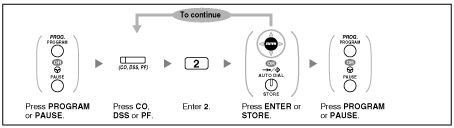
To clear the button
imu4034a.gif