1.11 Display Proprietary Telephone
1.11.1 Call Log
 Incoming Call Log
When you receive an outside call, the caller's information is recorded automatically in the incoming call log. The preprogrammed number of calls can be logged per extension.
When a call which is over the preprogrammed number of calls comes in, the oldest call is deleted.
You can modify the logged telephone number.
When the Call Log button light turns on, there is a call which you did not answer. |
| The following information is logged. |
| • | Caller's Name | | • | Caller's Phone & Number | | • | Date/Time of a call received | | • | Answered or Not Answered
Confirmed or Not Confirmed |
|
To confirm the log information with the Call Log button
To confirm the log information with the Navigator key
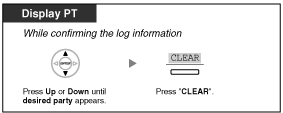
To clear the log information
To call
| | • | The Call Log button light shows the current status as follows:
Off: No incoming call. Or you have already viewed the call log.
Red on: You have missed calls to view. | | • | If your call is answered by another extension, the caller's information is recorded on the displays of both your extension and the answered extension. | | • | You can lock your call log by using an extension PIN (Personal Identification Number), so that you can prohibit access to your logged information. Refer to "3.1.2 Settings on the Programming Mode". | | • | You can also have a Call Log button for ICD Group (Incoming Call Distribution Group). | | • | If a call arrives while you are using the call log, the call log display will be replaced with the caller's information. |
|
Outgoing Call Log
| You can redial using the outgoing call log. |
To call
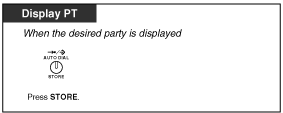
To store the caller's information for personal speed dialing
| | • | You can lock your call log by using an extension PIN (Personal Identification Number), so that you can prohibit access to your logged information. Refer to "3.1.2 Settings on the Programming Mode". | | • | If a call arrives while you are using the call log, the call log display will be replaced with the caller's information. |
|
1.11.2 Directories
You can select and call using the directories (Personal Speed Dialing Directory, System Speed Dialing Directory and Extension Number Directory).
Only personal directories can be stored, edited or deleted on your extension.
If a call arrives while you are using a directory, the display will be replace with the caller's information. |
| – Calling with the Directory |
| – Storing the Names and Numbers |
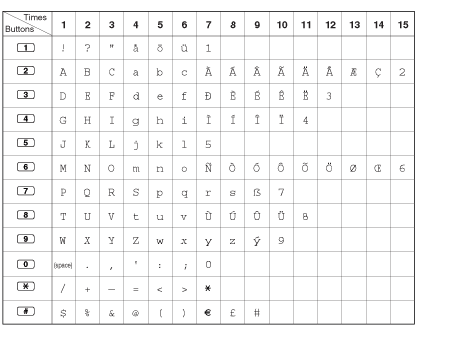
| – Entering Characters |
Calling with the Directory
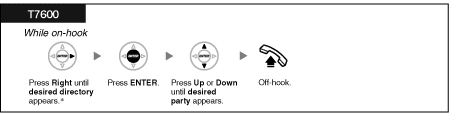
To select and call
|
| | • | * The display order is as follows:
One time: Personal Speed Dialing Directory
Two times: System Speed Dialing Directory
Three times: Extension Number Directory | | • | To cancel or exit, press the CANCEL button or "EXIT" on the display. |
|
|
| | • | Directory entries generally should include name and number. If the name is not registered, an entry cannot be displayed. |
|
|
Storing the Names and Numbers
To store a Personal Speed Dialing Directory item
| | • | Telephone number and name on the display are stored using the first spare Personal Speed Dialing memory available. | | • | For a PS user, refer to "Operating Instructions" for PS. |
|
Entering Characters
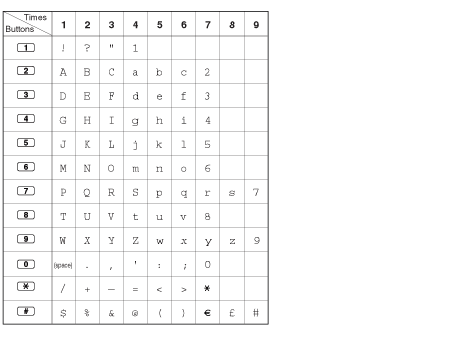
You can enter the following characters. The tables show you the characters available for each button. Table 1 or Table 2 can be programmed.
|
| Table 1 (Standard mode) |
|
| Table 2 (Option mode) |
|
1.11.3 System Feature Access
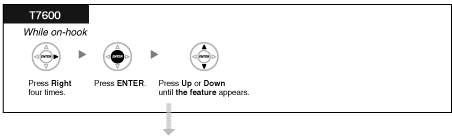
| You can access a feature with the "Feature Access" menu. |
To access "Feature Access" menu and select the feature
|
Features | Refer to |
|---|
| Automatic Callback Busy Cancel |
| | | | | | | | | | | External Background Music |
| | | |
|