1.3 Receiving Calls
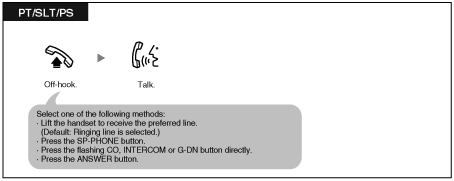
1.3.1 Answering Calls
| | • | The G-DN button light shows the current status as follows: | | Off: Idle
Green on: The line is in use. (You are using the line.)
Red on: Your extension is in Log-out mode from the incoming call distribution group. |
|
|
1.3.2 Hands-free Answerback
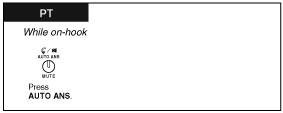
| You can answer an incoming call without going off-hook as soon as the line is connected. When an intercom call arrives, you will hear the caller talking without the phone ringing. When an outside call arrives, you will hear the caller talking after a preprogrammed number of rings. Hands-free Answerback for outside calls requires System Programming. Consult your dealer. |
| |
To set/cancel
| | • | The AUTO ANS button light shows the current status as follows: | | | | • | For a PS user, refer to "Operating Instructions" for PS. |
|
1.3.3 Call Pickup
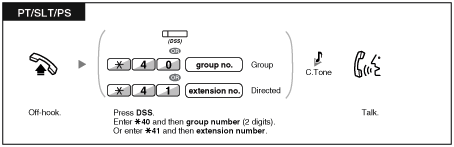
 Call Pickup
You can answer an incoming call that is ringing at another extension or group from your phone without leaving your desk.
The following types of pickup are available: |
Group Call Pickup: Picks up a call within your group.
Directed Call Pickup: Picks up a specified extension's call. |
|
| | • | If you receive a call waiting tone, you can ask a third party to pick up your second call with Directed Call Pickup. | | • | If there are multiple incoming calls for the same group, the longest waiting call is received first. |
|
| | • | You can also pick up a call by pressing the flashing DSS button. |
|
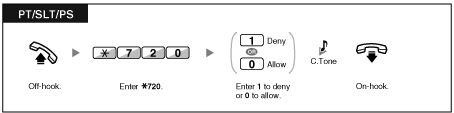
Call Pickup Deny
| You can deny or allow other people to pick up your calls. |
1.3.4 Trunk Answer From Any Station (TAFAS)
| You can be notified of incoming outside calls through an external speaker. These calls can be answered from any extension. |
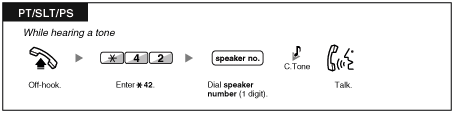
Through an external speaker
| | • | You can also receive a paging announcement via a speaker with this operation. |
|
1.3.5 ANSWER/RELEASE Button
The ANSWER and RELEASE buttons are convenient for operators using headsets.
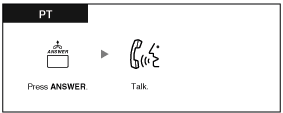
With the ANSWER button, you can answer all incoming calls.
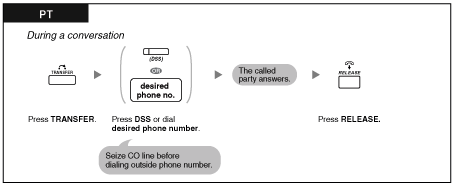
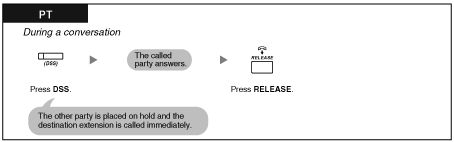
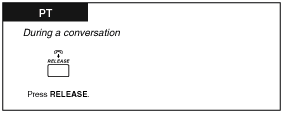
With the RELEASE button, you can disconnect the line during or after a conversation, or complete transferring a call. |
| |
To answer
To transfer a call
To talk to a waiting caller
To transfer an outside call to an extension with a one-touch operation
To end a conversation