1.9 User-supplied Equipment
1.9.1 Doorphone/Door Opener
| You can talk to a person at the door through the doorphone. Preprogrammed extensions or an outside party can receive the calls from the doorphone. You can open the door. |
–  Doorphone Call Doorphone Call |
| – Door Open |
Doorphone Call
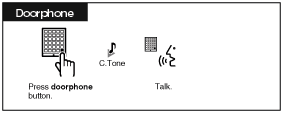
To call from the doorphone
To answer a call from the doorphone
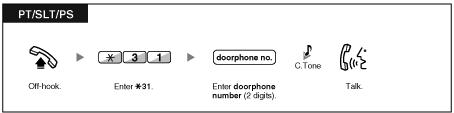
To call the doorphone
| | • | If no one answers a doorphone call within a specified time period, the call is canceled. |
|
Door Open
| Some extensions may be prohibited from using this feature. |
From a specified extension
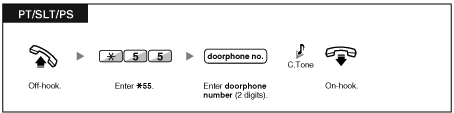
From any extension while talking to the doorphone
| | • | The door open will be triggered for a specified time period. |
|
1.9.2 Host PBX
External Feature Access (EFA)
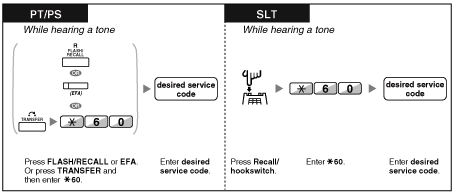
| You can access special features (e.g., Call Waiting) offered by a host PBX or telephone company. This feature is only effective for an outside call. |
<Example> To hold the current call and then talk to the new party
| | • | In this case, FLASH/RECALL button on a proprietary telephone is in the External Feature Access (EFA) mode. | | • | Regarding the service code, consult your dealer. |
|
1.9.3 Voice Processing System
Call Forwarding to Voice Mail (Voice Mail Integration)
| – To forward your calls to your mailbox |
| – To transfer a call to a mailbox |
| – To listen to messages |
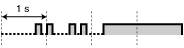
If you cannot answer calls, you can forward them to your mailbox. You can select the type of incoming calls (Intercom Calls/Outside Calls/Both Calls). If your telephone has a MESSAGE button, the MESSAGE light turns on and lets you know you have messages. Even if a MESSAGE button is not provided, you will hear an indication tone* when going off-hook.
You can also transfer received outside calls to a mailbox so that calling parties can leave messages. If you create a Voice Mail Transfer button on your phone, the transfer is done without knowing the mailbox number (Voice Mail Transfer).
The duration for recording depends on the voice processing system. |
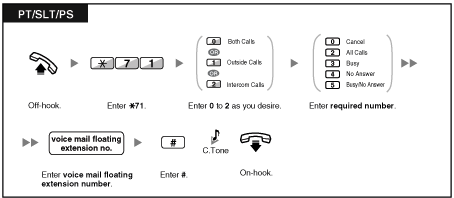
To forward your calls to your mailbox
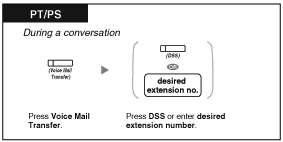
To transfer a call to a mailbox
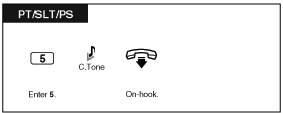
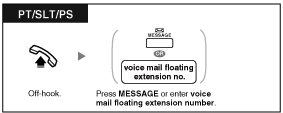
To listen to messages
| | *Indication tone after off-hook | |
| • | You can access a voice mail with one-touch. |
|
Live Call Screening (LCS)
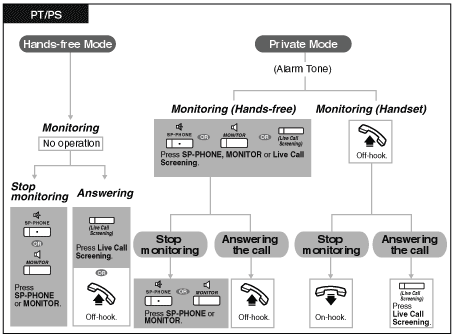
| While a caller is leaving a message in your mailbox, you can monitor the call without answering. If you so desire, you can answer the call while monitoring. There are two methods available (Default: Hands-free mode). |
Hands-free mode:
You can monitor the message automatically, live through the telephone speaker.
Private mode:
You will hear an alarm tone while the caller is leaving a message. |
|
Before operating
| • | Create a Live Call Screening (LCS) button (Personal Programming). |
| • | Select the mode, either Hands-free or Private (Personal Programming). |
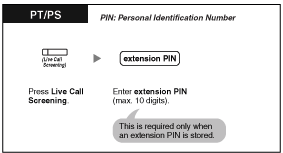
| • | Set the extension PIN (Personal Identification Number). |
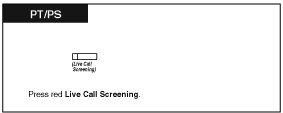
| • | Set the Live Call Screening feature. |
To set Live Call Screening
To cancel Live Call Screening
Operation Flowchart
| The operations in the shaded areas can be done hands-free. |
|
| | • | The Live Call Screening (LCS) button light shows the feature status as follows: | | Off: LCS is off.
Flashing green rapidly: Alerting in the Private mode.
Flashing green slowly: Monitoring.
Red on: LCS is on. |
| | • | The manager extension can clear an extension PIN. | | • | This feature is available for a single line telephone if it is connected to a proprietary telephone in parallel. (Private mode only)
To answer the call while monitoring, press Recall/hookswitch. | | • | Only the handset monitoring in the Private mode is available for PS users. |
|
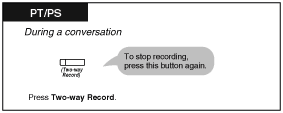
Two-way Record
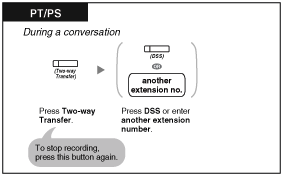
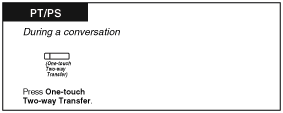
You can record a conversation into a mailbox while talking on the phone.
You can select the mailbox each time you record a conversation. |
| |
To record into your mailbox
To record into another mailbox (Two-way Transfer)
To record into another mailbox with one-touch (One-Touch Two-way Transfer)
| | • | The Two-way Record button light, Two-way Transfer button light or One-touch Two-way Transfer button light shows the current status as follows: | | Off: Not recording.
On: Recording the conversation. |
|
|
| | • | Note:
Many states have imposed regulations on the manner in which 2-way telephone conversations may be recorded, so you should inform the other party that the conversation is being recorded.
Consult your local telephone company for further information. |
|