2.4 Installation of the CO Line Cards

2.4.1 LCOT8 and LCOT16 Cards

Function

LCOT8:
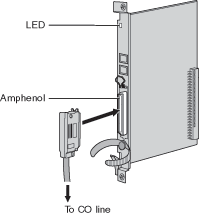
8-port analog CO line card with 2 power failure transfer ports. One CID8 card can be mounted on the LCOT8 card (refer to "2.4.2 CID8 Card").
LCOT16:
16-port analog CO line card with 4 power failure transfer ports. A maximum of 2 CID8 cards can be mounted on the LCOT16 card (refer to "2.4.2 CID8 Card").
imc2350m.gif

Accessory and User-supplied Items
Accessory (included): screws × 2
User-supplied (not included): Amphenol connector

Notes

To connect the Amphenol connector, refer to "2.2.9 Fastening Amphenol Type Connector".
For details about power failure transfer, refer to "2.11.1 Auxiliary Connection for Power Failure Transfer".
To confirm the CO line connection, refer to "Confirming the CO Line Connection" in "2.12.1 Starting the Hybrid IP-PBX".

Pin Assignments

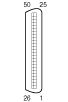
Amphenol Connector
 

No.

Signal Name

Function

No.

Signal Name

Function

imc2077b.gif
1
RA
Ring port 1
26
TA
Tip port 1
2
RB
Ring port 2
27
TB
Tip port 2
3
RC
Ring port 3
28
TC
Tip port 3
4
RD
Ring port 4
29
TD
Tip port 4
5
RE
Ring port 5
30
TE
Tip port 5
6
RF
Ring port 6
31
TF
Tip port 6
7
RG
Ring port 7
32
TG
Tip port 7
8
RH
Ring port 8
33
TH
Tip port 8
9
RI
Ring port 9
34
TI
Tip port 9
10
RJ
Ring port 10
35
TJ
Tip port 10
11
RK
Ring port 11
36
TK
Tip port 11
12
RL
Ring port 12
37
TL
Tip port 12
13
RM
Ring port 13
38
TM
Tip port 13
14
RN
Ring port 14
39
TN
Tip port 14
15
RO
Ring port 15
40
TO
Tip port 15
16
RP
Ring port 16
41
TP
Tip port 16
17-25
Reserved
42-50
Reserved

Note

Pin assignments for the pins 9 to 16 and 34 to 41 are for the LCOT16 card only.

LED Indications

Indication

Color

Description

CARD STATUS
Green/Red
OFF: Power Off
Green On: Normal (all ports are idle)
Green Flash (60 times per minute): Normal (a port is in use)
Red ON: Fault (includes reset)
Red Flash (60 times per minute): Out of Service

2.4.2 CID8 Card

Function

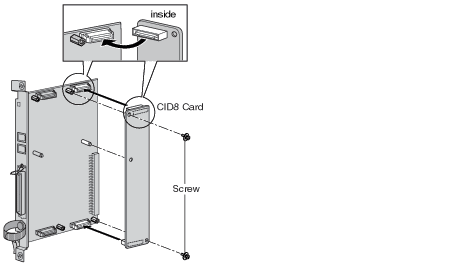
8-port Caller ID signal type FSK/FSK (with Call Waiting Caller ID [Visual Caller ID])/DTMF. To be mounted on the LCOT8/LCOT16 cards.
imc2360m.gif

Accessory and User-supplied Items
Accessory (included): screws × 2
User-supplied (not included): none

Note

Only 1 CID8 card can be mounted on the LCOT8 card.

2.4.3 T1 Card

Function

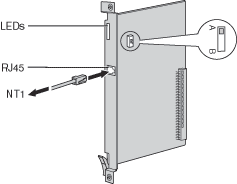
1-port T1 CO line card. EIA/TIA standard compliant.
imc2390m.gif

Accessory and User-supplied Items
Accessory (included): none
User-supplied (not included): RJ45 connector

Notes

Connect this optional service card to the CO line through NT1; do not connect to the CO line directly.
T1 Card must be installed behind an FCC registered and UL or CSA-NRTL listed CSU.
To confirm the CO line connection, refer to "Confirming the CO Line Connection" in "2.12.1 Starting the Hybrid IP-PBX".

CAUTION

T1 ports are SELV ports and should only be connected to SELV services.

Switch Settings

Switch

Type

Usage and Status Definition

A/B
Slide
Keep the switch at default A position. Do not change the position of this switch.

Pin Assignments

RJ45 Connector
 

No.

Signal Name

Level [V]

Function

imc2073b.gif
1
RX+
(+)
Receive data (+)
2
RX-
(-)
Receive data (-)
3
Reserved
4
TX-
(-)
Transmit data (-)
5
TX+
(+)
Transmit data (+)
6-8
Reserved

LED Indications

Indication

Color

Description

CARD STATUS
Green/Red
OFF: Power Off
Green ON: Normal (all ports are idle)
Green Flash (60 times per minute): Normal (a port is in use)
Red ON: Fault (includes reset)
Red Flash (60 times per minute): Out of Service
SYNC-ERR
Red
OFF: Normal
ON: Alarm
RAI
Red
OFF: Normal
ON: Alarm (Clock Slave)
Flash (60 times per minute): Alarm (Clock Master)
AIS
Red
OFF: Normal
ON: Alarm
SYNC
Green
OFF: Alarm
ON: Normal
Flash (60 times per minute): Normal (Clock Master)

2.4.4 PRI23 Card

Function

1-port ISDN Primary Rate Interface card (23B channels). NI (North American standard ISDN protocol) compliant.
imc2470m.gif

Accessory and User-supplied Items
Accessory (included): none
User-supplied (not included): RJ45 connector

Notes

Connect this optional service card to the CO line through NT1; do not connect to the CO line directly.
To confirm the CO line connection, refer to "Confirming the CO Line Connection" in "2.12.1 Starting the Hybrid IP-PBX".

CAUTION

PRI ports are SELV ports and should only be connected to SELV services.

Switch Settings

Switch

Type

Usage and Status Definition

A/B
Slide
Keep the switch at default A position. Do not change the position of this switch.

Pin Assignments

RJ45 Connector
 

No.

Signal Name

Level [V]

Function

imc2073b.gif
1
RX+
(+)
Receive data (+)
2
RX-
(-)
Receive data (-)
3
Reserved
4
TX-
(-)
Transmit data (-)
5
TX+
(+)
Transmit data (+)
6-8
Reserved

LED Indications

Indication

Color

Description

CARD STATUS
Green/Red
OFF: Power Off
Green ON: Normal (all ports are idle)
Green Flash (60 times per minute): Normal (a port is in use)
Red ON: Fault (includes reset)
Red Flash (60 times per minute): Out of Service
SYNC-ERR
Red
OFF: Normal
ON: Alarm
RAI
Red
OFF: Normal
ON: Alarm (Clock Slave)
Flash (60 times per minute): Alarm (Clock Master)
AIS
Red
OFF: Normal
ON: Alarm
SYNC
Green
OFF: Alarm
ON: Normal
Flash (60 times per minute): Normal (Clock Master)
D-LINK
Green
OFF: Alarm
ON: Normal

2.4.5 IP-GW4 Card

Function

4-channel VoIP gateway card. VoIP H.323 V.2, ITU-T G.729a, and G.723.1 compliant. G3 fax support.
imc2480a.gif

Accessory and User-supplied Items
Accessory (included): CD-ROM (including PC programming software and
documentation) × 1
User-supplied (not included): RJ45 connector

Notes

Maximum length of the Ethernet (10BASE-T) cable to be connected to this optional service card is 100 m (328 ft).
The IP-GW4 card occupies the space of 2 free slots when it is installed in the Hybrid IP-PBX.
For programming instructions and other information of the IP-GW4 card, refer to the manual for the IP-GW4 card. To program the IP-GW4 card, use the PC programming software designed for the IP-GW4 card.
To confirm the CO line connection, refer to "Confirming the CO Line Connection" in "2.12.1 Starting the Hybrid IP-PBX".

Pin Assignments

RJ45 Connector (10BASE-T)
 

No.

Signal Name

Input (I)/Output (O)

Function

imc2073b.gif
1
TPO+
O
Transmit data+
2
TPO-
O
Transmit data-
3
TPI+
I
Receive data+
4-5
Reserved
6
TPI-
I
Receive data-
7-8
Reserved

LED Indications

Indication

Color

Description

CARD STATUS
Green/Red
OFF: Power Off
Green ON: Normal (all ports are idle)
Green Flash (60 times per minute): Normal (a port is in use)
Red ON: Fault (includes reset)
Red Flash (60 times per minute): Out of Service
ONLINE
Green
ON: On-line mode
Flash: Emergency maintenance mode
ALARM
Red
OFF: Normal
ON: Alarm
IAM BUSY
Green
OFF: Not used
ON: At least one line is used
LINK
Green
OFF: Connection error
ON: Normal connection
DATA
Green
OFF: No data transmitted
ON: Data transmitting
COL
Green
OFF: No data collision
ON: Data collision
SIOSEL
Green
OFF: CPU power port used (maintenance port not available)
ON: Maintenance port available