1.4 Answering Features

1.4.1 Answering Features

1.4.1.1 Answering Features–OVERVIEW

Description

An extension user can answer incoming calls by the following methods:

Called Extension

Feature

Description

Details in

The user's own extension (PT only)
Line Preference–Incoming
The user can select the line seized when going off-hook.
1.4.1.2 Line Preference–Incoming
Direct One-touch Answering 
The user can answer an incoming call simply by pressing the flashing button.
Hands-free Answerback
The user can answer a call automatically and establish a hands-free conversation.
1.4.1.4 Hands-free Answerback
Another extension
Call Pickup–Directed/Group
The user can pick up a specific extension's call or a call in a specific call pickup group.
1.4.1.3 Call Pickup

1.4.1.2 Line Preference–Incoming

Description

A proprietary telephone (PT) user can select the method used to answer incoming calls from the following three line preferences.
Each of these line preferences can be assigned on each extension through personal programming (Preferred Line Assignment–Incoming).

Type

Description

No Line 
Selects a line by pressing the desired Line Access button to answer an incoming call after you go off-hook.
Prime Line 
Answers a call arriving at a Flexible CO button or G-DN button (on which the "Prime Line" is assigned) simply by going off-hook. This works even when multiple calls are received simultaneously.
Ringing Line (default) 
Answers the longest ringing call when multiple calls arrive at one's own telephone simply by going off-hook.

Conditions

[Prime Line]
The priority of the incoming call is as follows:
1)The call arriving at a button on which the "Prime Line" is assigned.
2)The call arriving at the INTERCOM button.

User Manual References

User Manual

1.4.1.3 Call Pickup

Description

An extension user can answer a call ringing at any other extension.
The following types of Call Pickup are available:

Type

Description

Directed 
A specified extension's call is answered.
Group 
A call within a specified call pickup group is answered.

Call Pickup Deny
An extension user can prevent other extensions from picking up calls ringing at his or her own extension.

Conditions

Call Pickup applies to:
Intercom, CO line, and doorphone calls
Internal Call Block
An extension which cannot call certain extensions based on Class of Service (COS) programming (rarrow.gif 1.1.2.2 Internal Call Block) also cannot pick up calls ringing at those extensions.

[Directed Call Pickup]
A user can also pick up a specified extension's call by pressing the corresponding DSS button. COS programming determines the extensions that can use this feature.

[Group Call Pickup]
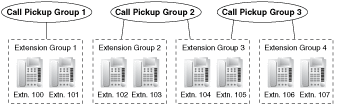
A specified number of call pickup groups can be created (rarrow.gif Extension Groups of a Pickup Group [650]), each of which consists of extension groups. One extension group can belong to several call pickup groups. (rarrow.gif 2.2.2 Group)
[Example]
imf1500a.gif

User Manual References

User Manual

1.4.1.4 Hands-free Answerback

Description

A proprietary telephone (PT) user with a speakerphone or optional headset can talk to a caller without lifting the handset. If the user receives a call in Hands-free Answerback mode, a hands-free conversation is established in the following method:

Call Type

Answering Method

Intercom Call
Established immediately after a beep tone at the called extension and the caller hears a confirmation tone.
CO Line Call*
Established after a specified number of rings, a called extension hears a beep tone.
*
Including a call from an extension that placed a CO line call on a consultation hold. (rarrow.gif 1.12.5 Consultation Hold)

Conditions

Hands-free Answerback applies to:
Intercom calls and CO line calls, including calls directed to an incoming call distribution (ICD) group in UCD or Priority Hunting distribution method. (rarrow.gif 1.2.2.2 Group Call Distribution)
Hands-free Answerback for CO Line Calls
System programming is required to use this feature.
Secret Monitor
The beep tone heard by the called party before answering can be eliminated through system programming.
Alternate Receiving/Calling Mode (Ring/Voice) Override
Hands-free Answerback overrides the Alternate Receiving mode preset on the telephone and the Alternate Calling mode from the caller.
Hands-free Answerback with Headset
The Hands-free Answerback feature can also be used with a headset.

Feature Guide References

User Manual References

User Manual