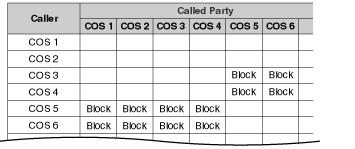
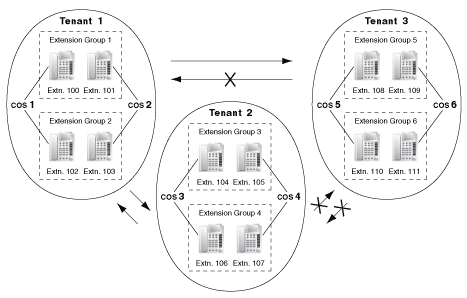
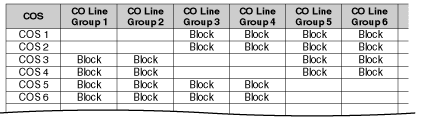
Each extension is assigned a Class of Service (COS) number ( Class of Service [602]). The following features operate differently depending on an extension's COS. Class of Service [602]). The following features operate differently depending on an extension's COS. | ||||||||||||||||||||||||||||||||||||||||||||
|
2.2 System Configuration–Software
Description
| Each extension is assigned a Class of Service (COS) number ( Class of Service [602]). The following features operate differently depending on an extension's COS. | ||||||||||||||||||||||||||||||||||||||||||||
|
Conditions
| • | Walking COS Extension users can make a call from extensions of a less-privileged COS by using their own COS temporarily. |
User Manual References
User Manual
Description
| This PBX supports various types of groups. |
| 1. | CO Line Group | ||||||||||||||||
| |||||||||||||||||
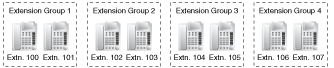
| 2. | Extension Group | ||||||||||||||||
| |||||||||||||||||
| |||||||||||||||||
| |||||||||||||||||
| 3. | Idle Extension Hunting Group | ||||||||||||||||
| |||||||||||||||||
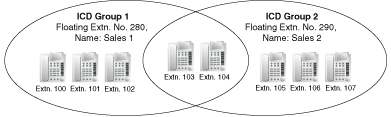
| 4. | Incoming Call Distribution Group (ICD Group) | ||||||||||||||||
| |||||||||||||||||
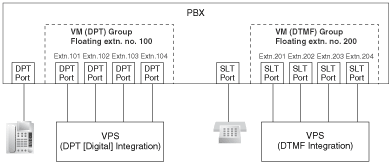
| 5. | VM Group | ||||||||||||||||
| |||||||||||||||||
| |||||||||||||||||
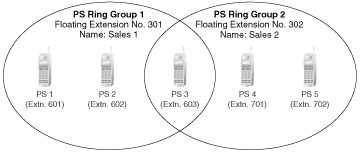
| 6. | PS Ring Group | ||||||||||||||||
|
Description
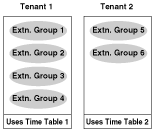
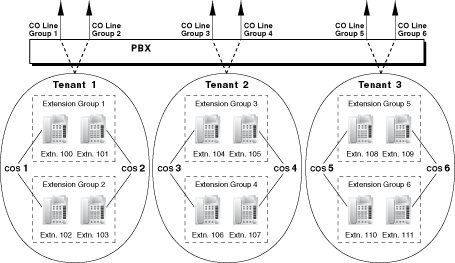
| Tenant service is a cost-effective method of providing PBX services to different offices or companies located in the same building, while using only one PBX. |
| 1. | Tenant Configuration | |||||||||||||||||||||||||||||||||||||||||||||||||||||||
| ||||||||||||||||||||||||||||||||||||||||||||||||||||||||
| 2. | System Management | |||||||||||||||||||||||||||||||||||||||||||||||||||||||
| ||||||||||||||||||||||||||||||||||||||||||||||||||||||||
| 3. | Call Blocking | |||||||||||||||||||||||||||||||||||||||||||||||||||||||
| ||||||||||||||||||||||||||||||||||||||||||||||||||||||||
|
Conditions
| • | The following features used by incoming call distribution (ICD) group are determined by the tenant number assigned to them ( 1.2.2.1 Incoming Call Distribution (ICD) Group Features–OVERVIEW): | ||||||||
|
Description
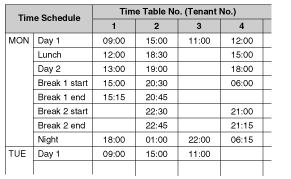
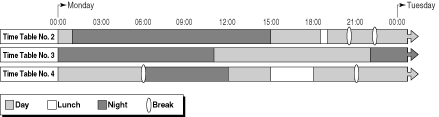
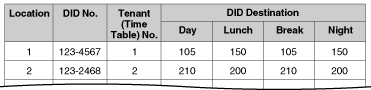
| Time modes are used by many PBX features to determine how they will function during different times of day. For example, incoming calls can be directed to sales staff during the day and to a Voice Processing System (VPS) at night, extension users can be prohibited from making long distance calls during lunch time, etc. There are four time modes–day, lunch, break, and night. The start and end times of each time mode are programmed for each day of the week in a Time Table. Each Time Table has a number which corresponds to the tenant it serves, i.e., Tenant 1 uses Time Table 1, etc. |
| 1. | Time Service Switching Mode | |||||||||||||||||||||||||||||||||||||||
| ||||||||||||||||||||||||||||||||||||||||
| 2. | Time Table | |||||||||||||||||||||||||||||||||||||||
| ||||||||||||||||||||||||||||||||||||||||
| 3. | Features Using Time Service | |||||||||||||||||||||||||||||||||||||||
| ||||||||||||||||||||||||||||||||||||||||
| ||||||||||||||||||||||||||||||||||||||||
| 4. | Holiday Mode | |||||||||||||||||||||||||||||||||||||||
| ||||||||||||||||||||||||||||||||||||||||
| 5. | Time Service Button | |||||||||||||||||||||||||||||||||||||||
| ||||||||||||||||||||||||||||||||||||||||
Conditions
| • | The start times of the following time modes can be specified through PC programming as well as PT programming ( Time Service Starting Time [102]). | ||||||||||||
| |||||||||||||
| |||||||||||||
| |||||||||||||
| |||||||||||||
| • | Time Service Switching Mode (Automatic/Manual) Button Any flexible button can be customized as the Time Service Switching Mode (Automatic/Manual) button. |
Feature Guide References
User Manual References
Description
| This PBX supports separate operators for both the PBX and each tenant. Any extension or incoming call distribution (ICD) group can be designated as an operator. Operators are the destination of Operator Calls. | ||||||||||
| ||||||||||
| Operator Call An extension user can call an operator by dialing the preprogrammed Operator Call feature number, often simply, "0". When an Operator Call is made, the call is directed to the tenant operator of the calling extension's tenant. If no tenant operator is assigned, the call is routed to the PBX operator. The tenant number of the calling extension determines the current time mode which is then used to determine the current PBX operator. If neither a tenant operator nor a PBX operator is assigned, the caller will hear a reorder tone. |
Conditions
| • | An extension or ICD group can be assigned as both a tenant operator and the PBX operator. |
| • | The same tenant operator can be assigned as the operator for multiple tenants. |
Feature Guide References
User Manual References
User Manual
Description
| An extension assigned as a manager (manager extension) is allowed to use certain features which most extensions cannot. Class of Service (COS) programming determines which extensions are manager extensions ( Manager Assignment [511]) and can therefore use the following manager features: | |||||||||||||||||||||||||||||||||||||||||||||||||||||||||||||||||||||||||||
| |||||||||||||||||||||||||||||||||||||||||||||||||||||||||||||||||||||||||||
Conditions
| WARNING When a third party discovers the personal identification number (PIN) (verified code PIN/extension PIN) of the PBX, there will be a risk that they will make fraudulent phone calls using the telephone line, and the cost will be charged to your own account. In order to avoid this problem, we strongly recommend the following points: | ||||||
|
| • | Manager Password Only one manager password can be assigned per PBX ( Manager Password [112]). |
User Manual References