1.15 Optional Device Features
1.15.1 Doorphone Call
| A visitor can use a doorphone to call its preprogrammed destination. Extension users can call a doorphone. |
| • | Hardware Requirement: An optional doorphone, OPB card and DPH card. |
| • | Call Destination
The destination of doorphone calls can be assigned to each doorphone port for each time mode ( Doorphone Call Destination [720]). The Time Table is determined by the tenant number assigned to each doorphone port. ( 2.2.4 Time Service) Doorphone Call Destination [720]). The Time Table is determined by the tenant number assigned to each doorphone port. ( 2.2.4 Time Service)
Certain destinations cannot be the destination of doorphone calls. ( 1.1.2.1 Internal Call Features–OVERVIEW) |
| • | Class of Service (COS) programming determines the doorphone ports that are able to make an outgoing CO line call. |
| • | Internal Call Block ( 1.1.2.2 Internal Call Block) determines which extensions can call a doorphone. |
| • | Ring Duration
If an incoming doorphone call is not answered within a preprogrammed time period, ringing stops and the call is canceled. |
| • | Call Duration
The duration of doorphone calls can be restricted by a system timer. If the timer expires, the call will be disconnected. |
| • | Door Open
While engaged on a doorphone call, an extension user can unlock the door to let the visitor in. ( 1.15.2 Door Open) |
| • | A doorphone number can be referenced for each doorphone port ( Doorphone Number Reference [729]). |
1.15.2 Door Open
Using an extension telephone, an extension user can unlock a door for a visitor.
The door can be unlocked by extension users who are allowed to unlock the door in the Class of Service (COS) programming ( Permission for Door Open Access [512]). While engaged on a doorphone call, any extension user can unlock a door to let a visitor in ( 1.15.1 Doorphone Call). |
| • | Hardware Requirement: A user-supplied door opener installed on each door. |
| • | A door opener can unlock a door even if no doorphone is installed. |
| • | Door Open Duration
An opened door will remain unlocked for a preprogrammed length of time ( Door Open Duration [207]). |
1.15.3 Trunk Answer From Any Station (TAFAS)
| A ring tone is sent through an external pager (loudspeaker) when an incoming call is received. Any extension user can answer the call. |
| • | Hardware Requirement: A user-supplied external pager |
| • | Floating Extension Number
A floating extension number can be assigned to an external pager ( External Pager Floating Extension Number [700]). An external pager is accessed by dialing its floating extension number. |
| • | Pager Volume
It is possible to change the volume level of an external pager through system programming. |
1.15.4 Background Music (BGM)
A proprietary telephone (PT) user can listen to background music (BGM) through the built-in speaker while on-hook and idle.
|
BGM–External
BGM can also be broadcast in the office through external pagers (loudspeakers) and can be turned on and off by an extension assigned as a manager. |
[BGM]
| • | Hardware requirement: A user-supplied external audio source, such as a CD player or radio. |
| • | The music heard through the PT is interrupted when going off-hook. |
| • | Each extension user can select the audio source. |
[BGM–External]
1.15.5 Outgoing Message (OGM)
| An extension assigned as a manager (manager extension) can record outgoing messages (OGMs) for the following features: |
Feature | Usage | Details in |
|---|
| Direct Inward System Access (DISA) |
| | When a call arrives on a DISA line, the caller will hear a message. |
| | | | | | | When answering the Timed Reminder Alarm, the user will hear a message. |
| |
|
| • | Hardware Requirement: An OPB card and MSG card. |
| • | Number of Messages and Recording Time
The PBX can record a maximum of 64 messages. The maximum recording time of each message is one minute. Note that the total recording time of the PBX is 8 minutes. |
| • | A floating extension number can be assigned to each outgoing message (OGM) ( Outgoing Message (OGM) Floating Extension Number [730]). |
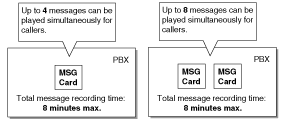
| • | Each MSG card can play four messages simultaneously. Adding additional MSG cards increases the number of messages that can be played simultaneously, but does not increase the total recording time or the number of messages that can be recorded. |
| | [Example] | | Note | | When an additional MSG card is added, it is blank–all necessary messages will need to be stored in the new card. This can be done in two ways: |
| | a) | By installing the new MSG card then recording each message again. The PBX will automatically store the new recordings in each MSG card. | | b) | By transferring messages from the PBX to a PC using KX-TDA Maintenance Console, then transferring them back to the PBX with the new MSG card installed. |
|
|
| • | The same message can be played to multiple callers simultaneously. |
| • | Recording Methods |
| | a) | Record voice messages through the extension telephone. | | b) | Transfer prerecorded voice messages from an external audio source to the PBX via an external music port. | | Note | | Record voice messages only; avoid the recording of music.
|
|
|
| • | After recording messages, a manager extension can also play them back for confirmation. |
| • | A progress tone is sent to a manager extension before recording messages for a preprogrammed time period, or while clearing a prerecorded message assigned to a floating extension number. |
| • | Record a message when PBX traffic is light, such as early morning or late evening. |
| • | When a manager tries to record a message, he or she will hear a ringback tone if a message channel is in use. When all ports of the MSG card(s) become idle, the manager will hear the progress tone for a preprogrammed time period, then the PBX will automatically switch to the recording mode. |
1.15.6 Direct Inward System Access (DISA)
Direct Inward System Access (DISA) allows outside callers to be connected to their desired PBX destinations without the use of an operator. Callers can listen to an outgoing message (OGM) instructing them as to which numbers to dial to be connected to the person or department they would like to speak with.
DISA can also give PBX users access to PBX features, such as making CO line calls or changing their extension settings, when they are outside the office.
To use DISA, the incoming call must first be directed (via DIL or DID distribution) to a floating extension number assigned to an OGM used by DISA. This OGM can then guide callers and allow them to: |
| • | Make an intercom call to an operator, extension, or to a floating extension number, such as an incoming call distribution (ICD) group or a modem used for remote system administration. | | • | Call another outside party via the CO lines of the PBX. | | • | Set or operate PBX features, such as Call Forwarding (FWD) or Extension Lock, remotely. |
|
OGM
When a call is directed to a floating extension number assigned to an OGM used by DISA, callers will hear the OGM. If using the DISA Automated Attendant (AA) service, this OGM will direct callers to press the appropriate digit (DISA AA number) to be connected to a specific destination. To access other PBX features, such as making intercom or CO line calls, the caller may dial the appropriate numbers while the OGM is playing.
Any extension assigned as a manager can record an OGM. ( 1.15.5 Outgoing Message (OGM)) |
DISA AA Service
DISA AA service allows a caller to dial a single-digit number (DISA AA number) and be connected to the desired party automatically. Each DISA OGM can be assigned up to ten destinations that can be called by dialing a DISA AA number (0—9). These destinations can be any destination within the PBX (or even another PBX connected by TIE Line service) which has an extension number or floating extension number. ( 1.26.1 TIE Line Service)
After or while listening to the OGM, the caller may dial a DISA AA number as directed by the OGM. ("Press 1 to speak to Sales. Press 2 to speak to Support.") Each DISA AA number directs the call to a preprogrammed location, which can even be another DISA floating extension number (Multistep DISA AA Service).
Since DISA AA numbers are single-digits, if the caller dials a second digit within a preprogrammed time period (DISA Second Digit Time for Automated Attendant), DISA AA service will be bypassed because the PBX will assume the caller is trying to access a specific feature.
|
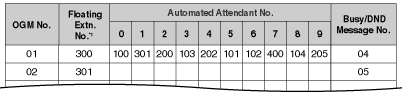
| [Programming Example: DISA OGM Setting] |
| Each DISA OGM can be assigned a floating extension number, a destination for each DISA AA number, and the OGM number of the OGM played when the called destination is busy or in Do Not Disturb (DND) mode. |
|
|
DISA Intercept Routing–No Dial
| If the caller fails to dial any digits within a preprogrammed time period (DISA First Digit Time for Routing to Operator When No Dial) following the OGM, the call is redirected to an operator extension. |
DISA Intercept Routing–Busy/DND
| If the destination of a DISA call is in DND mode or is busy (and has not set Call Waiting or FWD), the call will be redirected to an idle extension in the destination's idle extension hunting group. ( 1.2.1 Idle Extension Hunting) If no extension in the group is available, or if the destination of the DISA call is not a member of an idle extension hunting group, the call will be handled in one of the following ways, according to system programming: |
| a) | Busy Tone: The caller hears a busy tone. | | b) | Intercept Routing: The call will be routed to the Intercept Routing–Busy/DND destination assigned for the extension. | | c) | OGM: An OGM used only for when the destination is busy or DND can be played for the caller. ("The party you called is unavailable...") |
|
DISA Intercept Routing–No Answer
If the destination of a DISA call does not answer the call within a preprogrammed time period (DISA Intercept time) ( DISA Intercept Time [211]), the call will be redirected to the preprogrammed intercept destination. ( 1.1.1.5 Intercept Routing)
If the intercept destination does not answer the call within a preprogrammed time period (DISA Disconnect Time after Intercept) after the DISA Intercept time expires, the call will be disconnected. |
Call Retry
While hearing a ringback, reorder, or busy tone, the caller can press " " to "retry" the call. When a DISA call is retried, the caller will hear the original DISA OGM once again and can make the same or a different selection. " to "retry" the call. When a DISA call is retried, the caller will hear the original DISA OGM once again and can make the same or a different selection.
During a CO-to-CO line call, the caller can press "" to disconnect the CO line call and return to the original DISA OGM. If "Mode When DISA Receives DTMF *" is set to "Send DTMF *" the "" tone will be sent–the call will not be retried. |
DISA Security Mode
| Security can be enabled for the PBX to control the types of calls that can be made by callers using DISA. ( DISA Security Mode [732]) However, note that the security setting does not effect DISA AA calls (AA calls can only be made to preprogrammed destinations and security is not an issue) or Operator Calls ( 2.2.5 Operator Features). |
Security Mode | Intercom Calls | TIE Line Calls | CO Line Calls |
|---|
Without PBX Code | With PBX Code |
|---|
| | | | | | | | | | | | | | |
|
|
Walking COS/Verified Code Entry through DISA
| While the OGM is playing, DISA callers can use Walking COS ( 1.8.4 Walking COS) and Verified Code Entry ( 1.8.5 Verified Code Entry) to: |
| a) | Make calls via DISA which are prohibited by the DISA Security Mode | | b) | Gain access to certain features, such as FWD, Extension Lock, etc. (Walking COS only) |
|
This feature is particularly useful when a PBX user needs to make a business call while at home, or when an extension user forgets to set FWD on his or her extension before leaving the office.
All privileges and restrictions on making calls that apply when the user is using an extension telephone are also applied when using Walking COS or Verified Code Entry through DISA.
Additionally, setting features by using Walking COS through DISA can be enabled or disabled through system programming for each Class of Service (COS). ( 1.24.5 Remote Extension Control by User) |
CO-to-CO Line Calls through DISA
| DISA callers can use DISA to make CO line calls in either of the following situations: |
| a) | When the DISA Security Mode allows CO line calls | | b) | When the caller uses Walking COS or Verified Code Entry through DISA, and his or her COS allows CO line calls. |
|
If a call between two outside parties is established via DISA, the length of the call can be limited to a preprogrammed duration. ( 1.10.8 CO Line Call Limitation) A timer will activate when the call is connected, and a tone will be heard 15 seconds before the timer expires at five-second intervals.
At this point the call can be extended for a preprogrammed amount of time ( DISA CO-to-CO Line Call Prolong Time [210]) by pressing any dialing button excluding "". 15 seconds before the extended time runs out, the tone will be heard again.
The number of times a CO-to-CO line call can be extended is also programmable; if set to "0", calls can not be extended at all.
If the caller wishes to end the CO-to-CO line call but remain connected to the PBX in order to make other calls or access other DISA features, the caller can press "" at any time to return to the original DISA OGM (Call Retry).
|
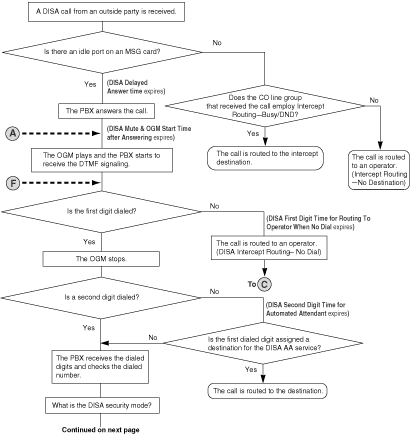
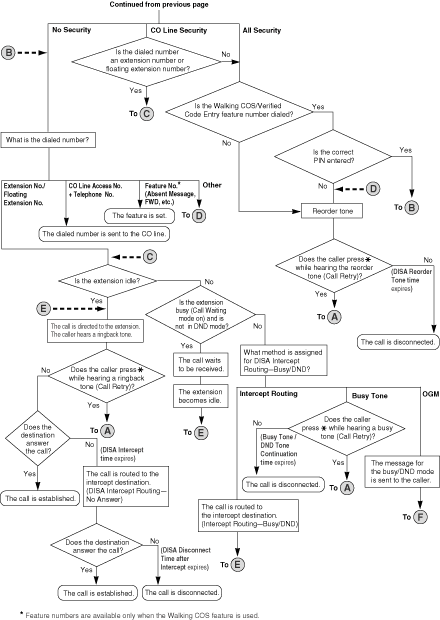
| [Flowchart] |
|
|
WARNING
There is a risk that fraudulent telephone calls will be made using the CO-to-CO Line Call feature of DISA.
The cost of such calls will be billed to the owner/renter of the PBX.
To protect the PBX from this kind of fraudulent use, we strongly recommend: |
| a) | Enabling DISA security (CO Line Security or All Security). | | b) | Maintaining the secrecy of extension PINs and verified code PINs. | | c) | Selecting PINs which are complex and random, so that the PINs may not be easily guessed. | | d) | Changing PINs regularly.
|
|
| • | Hardware Requirement: An OPB card and MSG card. |
| • | DISA Delayed Answer Time |
| | It is possible to set the DISA Delayed Answer time ( DISA Delayed Answer Time [209]) so that the caller will hear a ringback tone for a preprogrammed length of time before hearing an OGM. |
|
| • | DISA Mute Time |
| | Certain DTMF signals, such as Caller ID information, may be sent from the telephone company when a call is first connected. Because these signals may interfere with DISA, the PBX can be programmed to ignore DTMF signals for a specified amount of time (DISA Mute & OGM Start Time after Answering) after a call is connected. After the DISA Mute time passes, DTMF signals are recognized by the PBX and the OGM begins playing. |
|
| • | SMDR |
| | The following are logged by Station Message Detail Recording (SMDR) ( 1.23.1 Station Message Detail Recording (SMDR)) for DISA calls: | | a) | The floating extension number of the DISA OGM. | | b) | The destination of the DISA call. (Extension number for internal calls, telephone number for CO-to-CO line calls.) | | c) | The extension number used for Walking COS through DISA, or the verified code used for Verified Code Entry through DISA. |
|
|
| • | Tone Detection |
| | Three different types of tone detection can be used to disconnect a CO-to-CO line call via DISA. Each tone detection type can be enabled or disabled for each CO line group. |
|
| |
| • | DISA Reorder Tone Time |
| | If a caller makes an invalid selection, a reorder tone will be sent to the caller. The caller can retry the call by pressing "", otherwise the call will be disconnected after a preprogrammed length of time (DISA Reorder Tone time). |
|
| • | Call Deny |
| | Each COS can be programmed to accept or deny incoming DISA calls. A DISA call will be accepted or denied by an extension based on the COS of the extension. |
|
| • | When using Walking COS or Verified Code Entry, a PIN must be entered. If the PIN is entered incorrectly three times when using DISA, the line will be disconnected. If an incorrect PIN is entered a preprogrammed number of times, the PIN will be locked. Only an extension assigned as a manager can unlock a PIN, after which it will be reset. |
| • | Each OGM can be assigned a name to be used as a reference while programming. ( Outgoing Message (OGM) Name [731]) |
| • | Account Code Entry ( 1.5.4.3 Account Code Entry) can be used when making a CO line call via DISA. |