| An extension user can store frequently dialed numbers in the PBX. A stored number is dialed automatically with a simple operation. |
| 1. | Features | ||||||||||||||||||||||||||||||||||||||||||||||||||||||||||||||||
| |||||||||||||||||||||||||||||||||||||||||||||||||||||||||||||||||
| 2. | Valid Input | ||||||||||||||||||||||||||||||||||||||||||||||||||||||||||||||||
| |||||||||||||||||||||||||||||||||||||||||||||||||||||||||||||||||
| |||||||||||||||||||||||||||||||||||||||||||||||||||||||||||||||||
| |||||||||||||||||||||||||||||||||||||||||||||||||||||||||||||||||
1.6.1.1 Memory Dialing Features–OVERVIEW
Description
| An extension user can store frequently dialed numbers in the PBX. A stored number is dialed automatically with a simple operation. |
| 1. | Features | ||||||||||||||||||||||||||||||||||||||||||||||||||||||||||||||||
| |||||||||||||||||||||||||||||||||||||||||||||||||||||||||||||||||
| 2. | Valid Input | ||||||||||||||||||||||||||||||||||||||||||||||||||||||||||||||||
| |||||||||||||||||||||||||||||||||||||||||||||||||||||||||||||||||
| |||||||||||||||||||||||||||||||||||||||||||||||||||||||||||||||||
| |||||||||||||||||||||||||||||||||||||||||||||||||||||||||||||||||
Conditions
| • | CO Line Access by Memory Dialing A specific CO Line Access number can be stored along with the telephone number in Memory Dialing. However, if Memory Dialing is done after selecting a CO line, the stored CO Line Access number is ignored and the telephone number is sent using the selected CO line. |
Description
| A proprietary telephone (PT) user can make a call or access a feature with a one-touch operation. This is possible by storing the number, such as an extension number, telephone number, or feature number, in a One-touch Dialing button. |
Conditions
| • | One-touch Dialing Button Any flexible button can be customized as a One-touch Dialing button. |
| • | Full One-touch Dialing There is no need to go off-hook before pressing a One-touch Dialing button. |
Feature Guide References
User Manual References
User Manual
Description
| Every extension automatically saves the last external telephone number dialed, allowing the same number to be dialed again. |
| Automatic Redial If Last Number Redial is performed in hands-free mode and the called party is busy, the number will be automatically redialed a preprogrammed number of times (  Automatic Redial Repeat Times [205]) at 60-second intervals. Automatic Redial Repeat Times [205]) at 60-second intervals.This feature is available only on certain proprietary telephone (PT) models which have the SP-PHONE button. |
| Outgoing Call Log The last five (default) dialed numbers are automatically stored at each extension. A display PT user can redial easily any of the stored numbers. |
Conditions
| • | Memorized telephone numbers are replaced by new ones. |
| • | Automatic Redial is canceled if any dialing operation is done, an incoming call is answered during Automatic Redial, or the Redial Call No Answer Ring time expires. The Redial Call No Answer Ring time is programmable. |
| • | Automatic Redial is only available for calls that are dialed using a PRI line. |
| • | Interrupt Redial When the called party or the seized CO line is busy, it is possible to press the REDIAL button continuously until the called party or the CO line becomes idle. There is no need to go off-hook before pressing the REDIAL button. |
| • | Storing the Call Log Information in Personal Speed Dialing When storing a number and name into Personal Speed Dialing from the call log, the Idle Line Access number is automatically attached to the telephone number. ( 1.6.1.4 Speed Dialing–Personal/System) |
User Manual References
User Manual
1.6.1.4 Speed Dialing–Personal/System
Description
| An extension user can make calls using abbreviated dialing for frequently dialed numbers which are stored in the PBX, either in the extension's Personal Speed Dialing, or in System Speed Dialing ( System Speed Dialing Number [001]). |
| Personal Speed Dialing is also known as Station Speed Dialing. |
Conditions
| • | Any number, such as a telephone number or feature number, can be stored in Speed Dialing. A name can be assigned to each Personal Speed Dialing number through personal programming, and also to each System Speed Dialing number ( System Speed Dialing Name [002]). |
| • | Call Directory–Speed Dialing Display proprietary telephone (PT) users can make a call by selecting a stored name shown on the display. |
| • | Personal Speed Dialing Display Lock An extension user can lock his or her Personal Speed Dialing display to prevent others from viewing it. In this case, the Incoming and Outgoing Call Log information displays are also locked. An extension personal identification number (PIN) is required to use this feature. ( 1.24.1 Extension Personal Identification Number (PIN)) |
| • | TRS Override by System Speed Dialing It is possible to override Toll Restriction (TRS) when dialing a number using System Speed Dialing ( TRS Level for System Speed Dialing [509]). ( 1.8.1 Toll Restriction (TRS)) |
User Manual References
User Manual
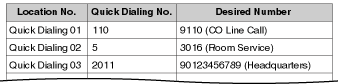
Description
| An extension user can make a call or access a feature easily. This is enabled by storing the number (extension number, telephone number, or feature number etc.) for Quick Dialing. Quick Dialing is convenient in situations such as the following: | ||||||||
| ||||||||
|
Conditions
| • | Quick Dialing numbers follow the flexible numbering plan. ( 2.3.5 Flexible Numbering/Fixed Numbering) |
User Manual References
User Manual
Description
| An extension user can make an outgoing call by simply going off-hook, if the user has previously stored the telephone number or the extension number. If the Hot Line feature is set and the user goes off-hook, a dial tone is generated for a specified time assigned through system programming ( Hot Line Waiting Time [204]) and then dialing starts. During this waiting time the user can dial another party, overriding the Hot Line feature. |
| This feature is also known as Pickup Dialing. |
Conditions
| • | Compatible Telephone Proprietary telephone (PT), single line telephone (SLT), T1-OPX, and portable station (PS) |
User Manual References
User Manual
 /#
/#